Guideline & SSAG support, court forms, disclosure and agreements — answered in chat, anywhere and on any device.
Assistant prepares. You approve.
Book a demo →Assistant works with the same connected file as the rest of Divorcepath — the calculations, forms, documents and disclosure your team already uses.
Guideline & SSAG ranges, gross-ups, restructuring, scenario comparisons.
Update financial statements from new information — totals recalculate.
Read uploaded documents, extract the data, track what’s outstanding.
Draft from the clause library; figures flow in from the file.
Keep profile data current — every change reviewed and approved by you.
Work with Assistant is a new tab in Divorcepath — a catalog of real, multi-step jobs you can hand off in one click. Every task opens a chat with the instruction already written, so you review and send before anything happens. And before Assistant changes your data — a calculation, a document, a client’s finances — it asks.
Hand over a T4 and get an updated calculation. Reconcile the property picture. Share a calculation with your client — after you approve the invite.
Bank statements and disclosure become updated finance records and a financial statement that’s ready to swear. Budgets built from what’s on file.
Respond to a redline with a blackline and drafted replies. Update agreement terms with tracked revisions. Refresh a document’s figures. Prepare court forms.
Chase what’s outstanding with drafted requests. Have incoming disclosure checked for gaps, weak proof and duplicates — with proposed next actions.
Run a conflict search before you take the matter. Open a file from a plain-language description. Follow up stale interviews and merge completed answers.
A status summary and the next three steps. An audit of what changed recently — and the ability to roll mistakes back.
Settlement positions bracketed by your calculations. A red-team of your own file. Evidence red flags, mediation briefs, chronologies, and prep for the difficult conversation.
Every delegation in the catalog is exercised end-to-end against a live environment as part of our engineering process — graded on whether it actually finishes the job, not whether it sounds finished.
A new T4 arrives on a spousal support file. Here is the whole update, end to end.
Attach the document and say what you need: “Sarah’s new T4 just came in — update her income and rerun support.” No forms, no menus. Watch the whole exchange play out.
The T4 is parsed like any other disclosure upload — income identified, values verified against the source, and conflicts with the file flagged for your review.
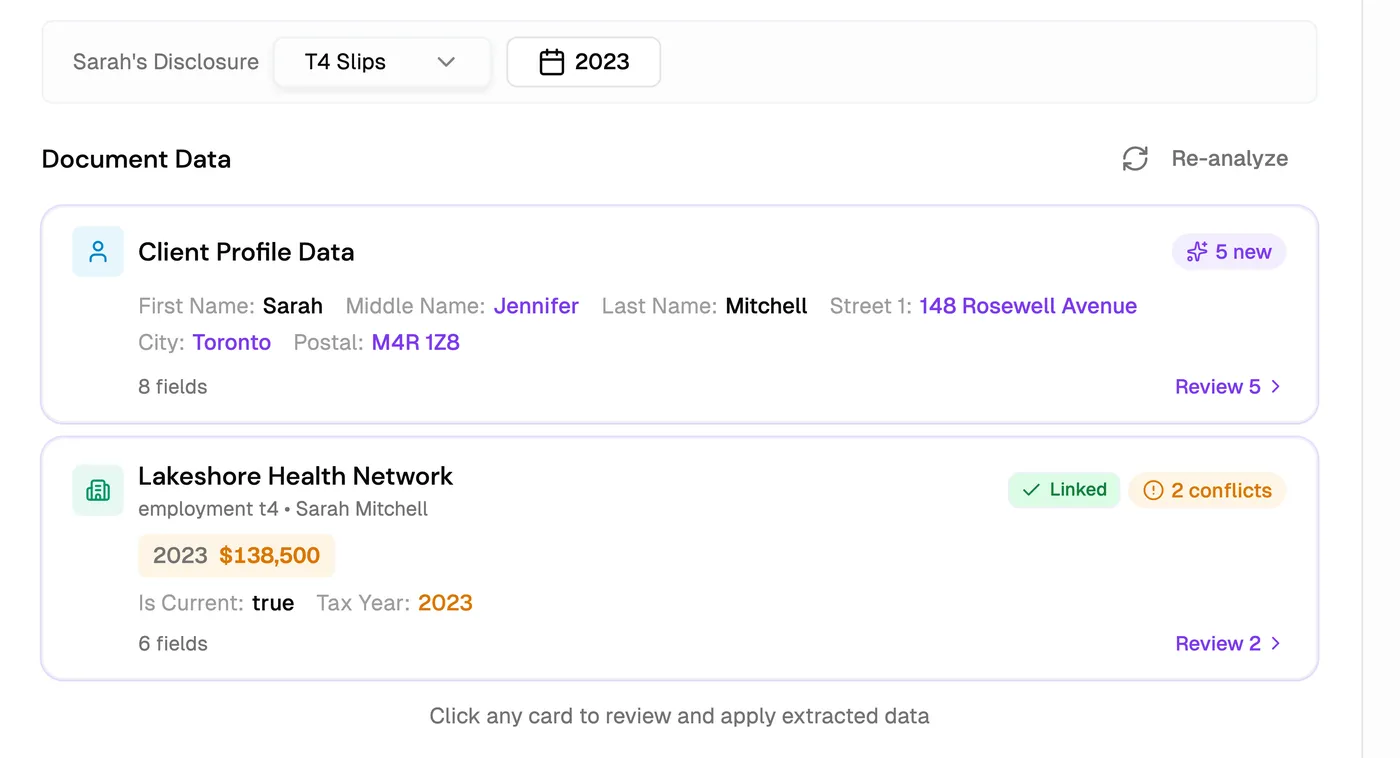
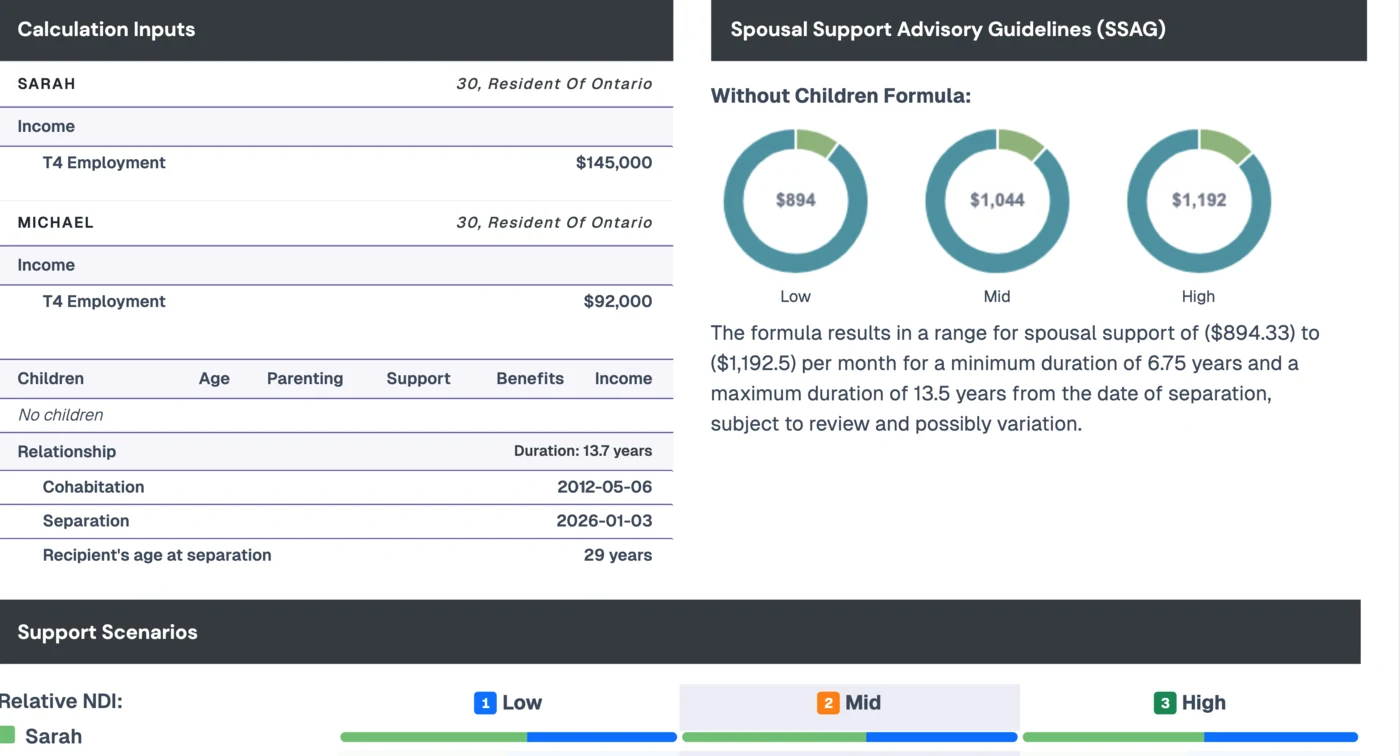
The income update is proposed as an approval card — nothing changes until you say so. On approval, support recalculates and the new SSAG range comes back in chat.
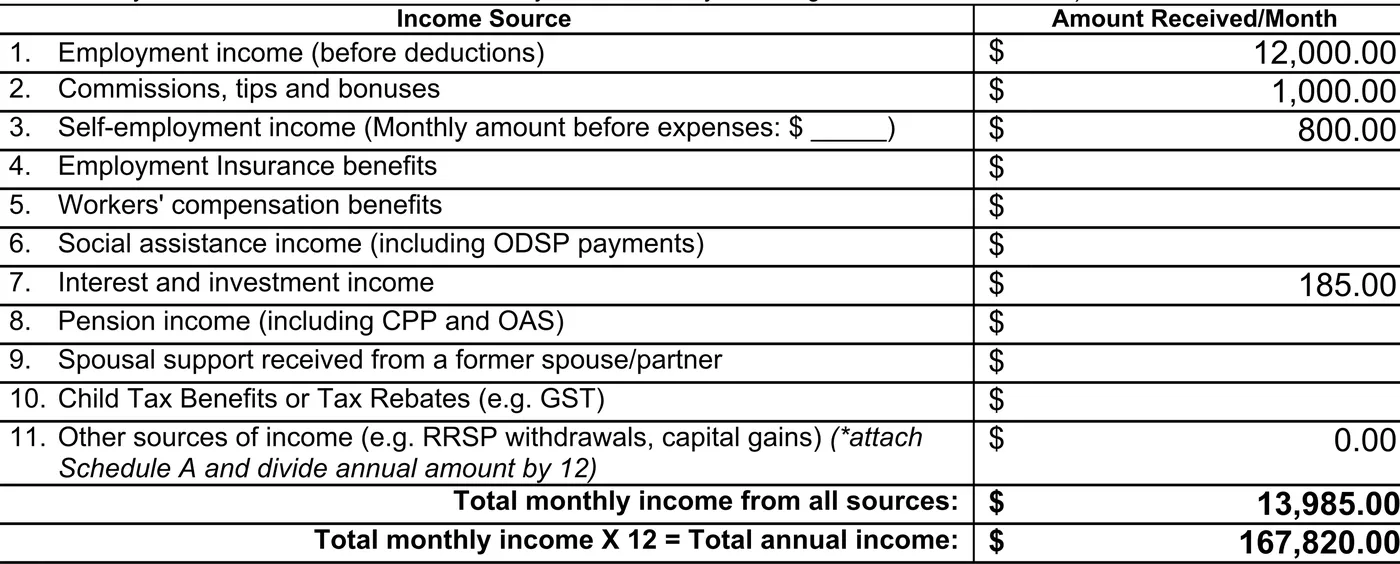
“Update the Form 13.1 to match” — the financial statement updates from the file, totals recalculate, and a blackline is ready for your review.
Built for professional responsibility: Assistant proposes, and every change to your file happens with your explicit approval.
Every write starts as a card you can approve or dismiss. Nothing moves without you.
Calculations come from the same engine as the rest of the platform — not from a language model.
Independently examined controls; report available under NDA. Trust centre →
Client matter data is stored in Canadian datacentres.
No. Assistant prepares changes and presents them as approval cards. You approve or dismiss each one — nothing is written to the file, the profile, or a document without your explicit approval.
Run and re-run support calculations, update client income and profile data from documents, review disclosure and track what’s outstanding, update court forms, and draft agreement language from the clause library — all against the same connected file.
From Divorcepath’s calculation engine — the same Guideline and SSAG engine behind the platform’s calculators. Assistant orchestrates the work; it does not invent figures.
The same way as the rest of the platform: SOC 2 Type 1 examined controls and data stored in Canadian datacentres. See the Trust centre for details.
Join hundreds of Canadian family lawyers saving hours on every file.
7-day free trial · Cancel anytime · Free onboarding included

