Switching?
DivorceMate discontinues legacy DM Cloud on December 31. We’ll move your files across for free → Leaving legacy DM Cloud? See how switching works →
Family law software for Canadian lawyers, mediators and clerks

Complete support calculations, court forms and agreements

Clients answer simple questions and upload documents from their phone. You review and edit every figure, then file the financial statement and track disclosure.

DivorceMate’s legacy Cloud ends December 31, 2026. Moving a firm? Book a 15-minute call →

$80 CAD per user per month on an annual plan, or $100 month to month, plus tax. No contract. Full refund within 30 days.
  • 1M+ support calculations
  • 300+ firms
  • 706 court forms
  • SOC 2 Type 1, data in Canada
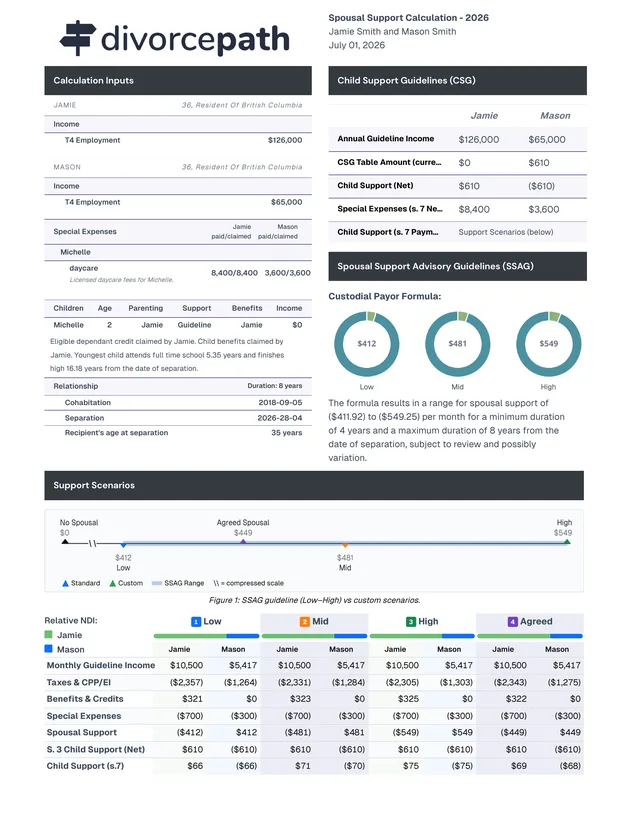
CalculationsSupport calculation
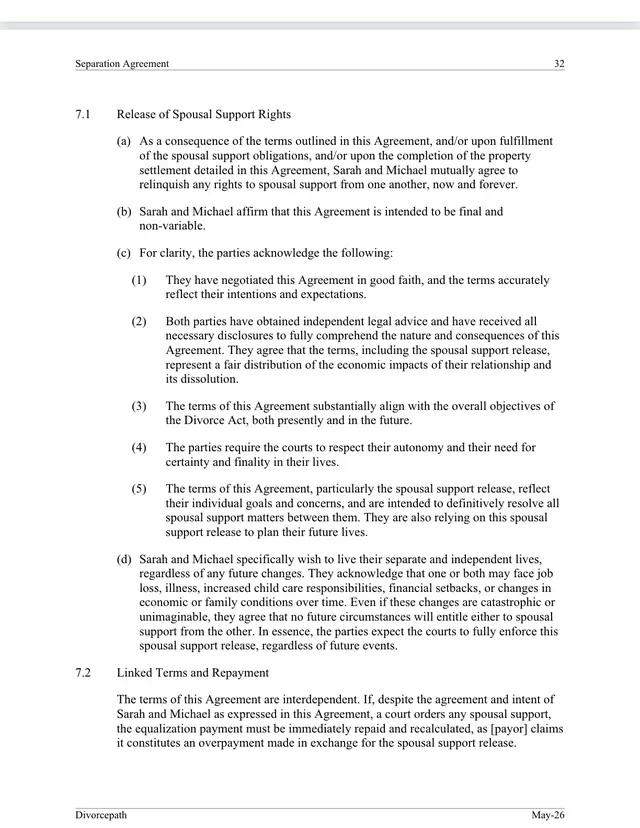
AgreementsSeparation agreement
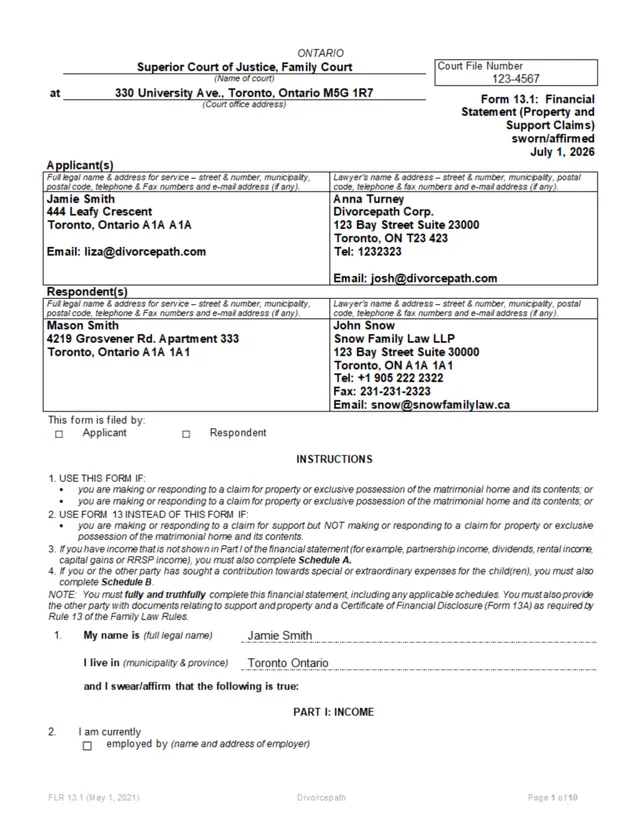
FormsForm 13.1 (Ontario)
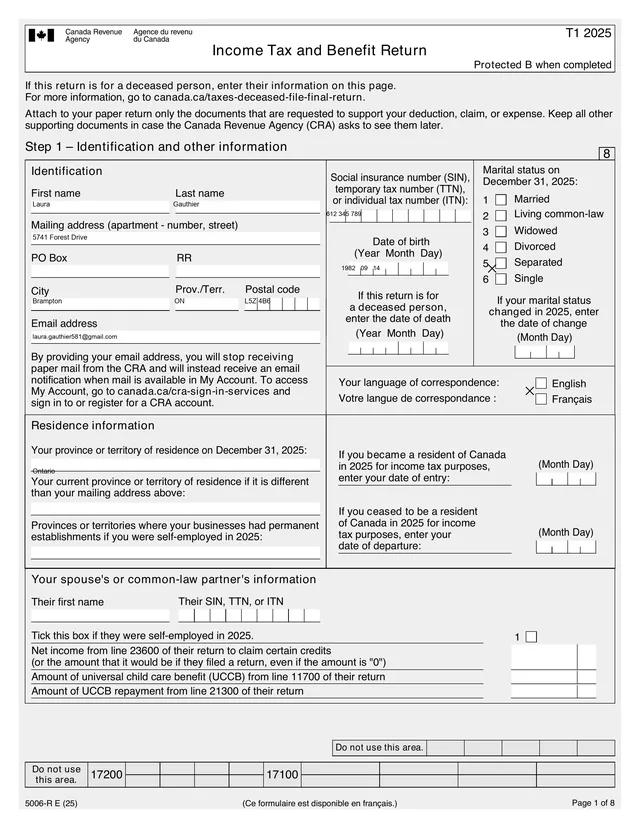
DisclosureTax return & NOA
Calculations

Child and spousal support for every province and territory.

  • The Child Support Guidelines that apply, and SSAG ranges
  • Lump sum, restructuring and gross-ups
  • Reports a client can follow
Learn more →
Agreements

Agreement precedents for nine provinces.

  • Choose your clauses and the draft renumbers itself
  • Separation agreements, cohabitation agreements and marriage contracts
  • Use your firm’s own Word templates
Learn more →
Forms

Court forms do the math.

  • 706 forms for every province outside Quebec
  • Built-in calculations, pre-filled from the file
  • Fully editable, in the browser or in Word
Learn more →
Disclosure

Client documents, read and tracked.

  • Reads T4s, notices of assessment, pay stubs and bank statements
  • Correct any figure before it is used
  • Shows what’s outstanding, for both parties
Learn more →

What Divorcepath users say

Hours to minutes
“Tasks that used to take hours now take minutes, and the platform continues to evolve with each update.”
Angelina Macri Family lawyer and firm founder, Ontario (20+ years) Read the case study →
Fewer tools
“The platform replaced multiple tools, saved us time, and gave clients clearer financial insights.”
Eva Sachs CFP, CDFA, divorce financial consultant Read the case study →
Province-wide access
“We selected Divorcepath to provide access to family law tools across all 30 of our library branches in British Columbia.”
Courthouse Libraries BC 30 branches across British Columbia

You already know the numbers. The problem is typing them five times.

One family file puts the same income into the support calculation, the financial statement, two or three court forms and the agreement. Every retype costs unbilled time and invites a mistake that opposing counsel will find.

Retyping is unbilled time

Your clerk copies the same T4 figures into the calculator, then the financial statement, then the next form, and does it all again when income changes.

Documents arrive in pieces

Pay stubs come by email, the notice of assessment comes a week later, and nobody is sure what’s still outstanding for either party.

One new figure means redoing the file

A new notice of assessment means rerunning support and correcting every form that used the old number.

The first meeting goes to collecting details

You spend the first hour gathering income, expenses and property details that the client could have filled in at home.

How it works

Your client answers questions and uploads documents. You review and edit every figure, then produce the support calculation, court forms and agreement from the same client file.
Step 1 · Intake

Simple questions your client answers on their phone

Send your client a link. Before the first meeting, they answer plain questions about income, expenses, property and parenting on their phone or computer. You can also go through the questions with them. Their answers go straight into the client file.

  • Guided online interview for each party
  • Answers go straight into the client file
  • Fewer calls and emails to chase details
  • Questions you can tailor to your practice
Learn more about Client Interviews →
Step 2 · Documents

Client documents, read for you

Clients upload their documents through a secure link: T4s, notices of assessment, tax returns, pay stubs, bank statements or anything else. Divorcepath reads each one, you review and correct the figures before they go into the file, and you can see what’s still outstanding from each party.

  • Reads any document, from T4s to bank statements
  • You review and edit every figure before it is used
  • Tracks what each party has disclosed
  • Exports disclosure lists and required court forms
Learn more about Financial Disclosure →
Step 3 · Support

Support you can explain and defend

Child support under the federal or provincial Child Support Guidelines that apply, and spousal support under the Spousal Support Advisory Guidelines, with low, mid and high ranges. Support and tax are calculated by our engine, not an AI model, and every report shows its inputs and assumptions.

  • SSAG low, mid and high ranges, with duration
  • Section 7 expenses, lump sums and restructuring
  • Gross-ups and guideline income adjustments
  • Side-by-side scenarios for negotiation and mediation
  • PDF reports for every province and territory
Learn more about Support Calculations →
Step 4 · Forms

Financial statements and court forms, already filled in

Court forms for every province outside Quebec, including each province’s financial statement, come filled in from the client’s file, and you can edit any figure. Support, income and property fields calculate themselves, and totals recalculate as you edit. Work in the browser or in Word, then export to PDF.

  • Filled in from the client file
  • Support and financial fields calculated for you
  • Totals recalculate as you edit
  • Edit in the browser or in Word
Learn more about Court Forms →
Step 5 · Agreements

Agreements that start from the same numbers

Build separation agreements, cohabitation agreements and marriage contracts from precedent clauses, with precedents for nine provinces. Choose the sections you need, and the calculated support and property terms come from the same client file.

  • Preview and choose sections before you draft
  • Add or remove a section and the draft renumbers itself
  • Calculated support and property terms flow into the draft
  • Edit in your browser or export to Word
Learn more about Agreements →

Your clerks prepare the file. Give them forms that fill themselves.

Lawyers, law clerks, mediators and financial professionals work on the same client files, with role-based access, Clio sync and your own Word templates.
✦ Assistant

Ask for the change.
Approve the result.

Tell Assistant a new T4 came in. It updates the income, reruns support and prepares a blackline of the financial statement, in chat, on any device.

Nothing changes until you approve it.

T4 — 2025.pdfPDF · 182 KB
Sarah’s new T4 just came in — update her income and rerun support.
✦ Assistant T4 shows 2025 employment income of $145,000 — I’ll update her income and rerun support.
Approval neededUpdate income & rerun support
DismissApprove
✦ Assistant Done — income updated. New spousal range: Low$894 Mid$1,044 High$1,192
Update the Form 13.1 to match.
✦ Assistant Form 13.1 updated — blackline ready for your review.
Switching

Moving off DivorceMate? Move once.

DivorceMate discontinues legacy DM Cloud on December 31. At no charge, we bring your client profiles across, attach your DivorceMate calculations as PDFs with the inputs re-keyed so you can rerun them, and import your Word forms and agreements. You can run both systems side by side, and we plan the cutover around your renewal date.

  • Free migration Client profiles, calculations, forms and agreements
  • Both systems side by side Cut over when your team is ready
  • Live training Sessions for lawyers and for clerks
  • Planned around your renewal Bring your DivorceMate renewal date to the call

How Divorcepath compares

The options most Canadian family law firms weigh, and what each one is best for.
FeatureDivorcepathDivorceMateChildViewExcel, Word and government forms
Child Support Guidelines and SSAGYesYesYesManual table lookups
Financial statement and court forms from the client fileYes, every province outside QuebecYesSome provincesTyped by hand
Clients upload documents and Divorcepath reads themYesCompare on a real file during your trial
Clients answer questions on their phoneYesCompare on a real file during your trial
Agreement precedentsYes, nine provincesCompare on a real file during your trial
TermsMonthly or annual12- or 36-month termsAnnual licence—
Price per user$80/month on an annual plan, $100 month to month$169–$250/month*From $650/year*Your time
Best forFirms that prepare the whole fileFirms committed to LEAPSupport calculations at the lowest priceA few simple files a year

* DivorceMate pricing as quoted to members of the Family Lawyers Association of Ontario in March 2025, depending on term and bundle. ChildView pricing from childview.ca, November 2026. See detailed comparisons →

Enterprise

Secure deployment for larger teams

Rolling out Divorcepath across a larger organization? We help you plan a secure rollout, with single sign-on, enterprise integrations, and guided onboarding.

  • Microsoft Entra SSO + SCIM
  • SharePoint and enterprise document management integrations
  • Dedicated rollout support, training, and invoicing
  • Client matter data stored in Canada
Explore enterprise deployment →
For larger firms

A planned rollout for larger teams.

From security review to staff training, we help larger teams deploy Divorcepath with a clear implementation plan.

Security and procurement
SOC 2 Type 1 report under NDA, help with privacy reviews, and annual invoicing.
Rollout support
Migration planning, onboarding, and firm-wide training as part of the rollout.

Questions firms ask before a trial

What does my client have to do?
Answer simple questions about income, expenses, property and parenting on their phone or computer, and upload documents such as T4s and notices of assessment. Their progress saves as they go, so they can stop and come back.
Do the agreements read like a lawyer’s precedent?
They are written in the style of Canadian family law precedents: plain obligations, the parties’ names, and lists of options you keep or strike. You choose the sections and can edit every clause.
Are the calculations accurate enough for court?
They follow the federal or provincial Child Support Guidelines that apply and the Spousal Support Advisory Guidelines, with federal and provincial tax for every province and territory. Every report shows its inputs and assumptions, so you can check and explain the result.
Will my numbers match opposing counsel’s DivorceMate numbers?
Both apply the same Guidelines and SSAG. When results differ, check the inputs and tax assumptions first. The Divorcepath report lists each one, so you can find the difference quickly.
How long does it take to learn?
Expect a short adjustment period. Every professional plan includes free live onboarding, and clerks can join their own session.
What if I only have family files some months?
Choose the monthly plan at $100 per user per month. There’s no contract. Firms with steady family work pay $80 per user per month on the annual plan.
Do clerks need their own seat?
Yes. Each person who works in Divorcepath, lawyer or clerk, has a seat at the same per-user price. A lawyer needs a seat to be named on documents and assigned to files, even when a clerk prepares them.
Is 7 days long enough to decide as a firm?
If you’re a firm of 3 or more, ask for a longer trial when you book a call. We’ll set it up so your partners can decide on a real file.
Can we keep our Word templates?
Yes. The Word add-in fills your own templates with client data, and we import your templates when you switch.
Do we have to stop using Clio?
No. Divorcepath syncs clients and matters with Clio both ways.
Where is client data stored?
Client files, uploaded documents and document reading are stored and processed in Canada, and Divorcepath has a SOC 2 Type 1 report available under NDA. Assistant may use contracted AI providers outside Canada. The Trust Centre explains exactly what is sent.

Your next financial statement, started by your client and finished by you

Start a 7-day free trial, or book a 15-minute call if you’re moving a firm off DivorceMate.

Start a 7-day free trial Book a call

No contract  ·  Free onboarding  ·  Free DivorceMate migration