Divorcepath AI Assistants let an approved AI assistant work with your Divorcepath matters. You can ask the assistant to review matter readiness, find missing information, prepare profile or financial updates, generate work product, and return documents or calculation summaries for review.
The important rule is simple: an assistant can prepare work, but Divorcepath does not save changes or generate new work product until you review and approve the proposed action.
Download the Divorcepath assistant package
The Divorcepath assistant package gives Codex a ready-to-use skill for Divorcepath MCP. It also includes client-neutral prompts and workflow guidance you can reuse with Claude, ChatGPT/OpenAI MCP apps, and other approved assistants.
The package does not include organization details or credentials. Your assistant authorizes Divorcepath through sign-in after the MCP connection is added.
How legal teams use AI Assistants
Think of the assistant as a reviewed matter-work helper. It is most useful when you give it a practical legal workflow instead of asking it to use technical tools.
| What you want to do | What to ask | What Divorcepath returns |
|---|---|---|
| Get oriented in a matter | Review this matter and tell me what is missing before we generate financial statements and support calculations. | A matter summary, completion status, missing facts, and recommended next steps. |
| Complete party and child information | Update the spouse's birth date and residence from these notes, then show me the preview before saving. | A reviewable before-and-after preview for the selected party or child fields. |
| Update financial records | Add this employment income for the client and flag anything you need me to confirm. | A proposed income, asset, debt, or child-expense update with warnings and approval status. |
| Prepare a support calculation | Review the current calculation, ask me for missing facts, then prepare an updated calculation preview. | Changed fields, readiness warnings, support-result deltas, and PDF availability. |
| Find and generate court forms | Find the financial statement forms available for this jurisdiction and prepare the right form from the current matter profile. | Matching court-form templates, template-completeness readiness, specialized guidance where available, and generated Word documents after approval. |
| Prepare an agreement or other document | Find the separation agreement template and prepare a document from the current matter profile. | A reviewable document-generation request, then a Word document and section summary after approval. |
| Retrieve work product | Give me the lawyer-readable calculation summary and the Word file for the financial statement. | Plain-language summaries, inline previews, and signed links for available Word or PDF files. |
| Review or revise a document | Review this agreement and propose edits I can approve in the Divorcepath editor. | Anchored document-edit proposals, tracked-review context, and a Divorcepath editor link for visual review and application. |
Review before anything is saved
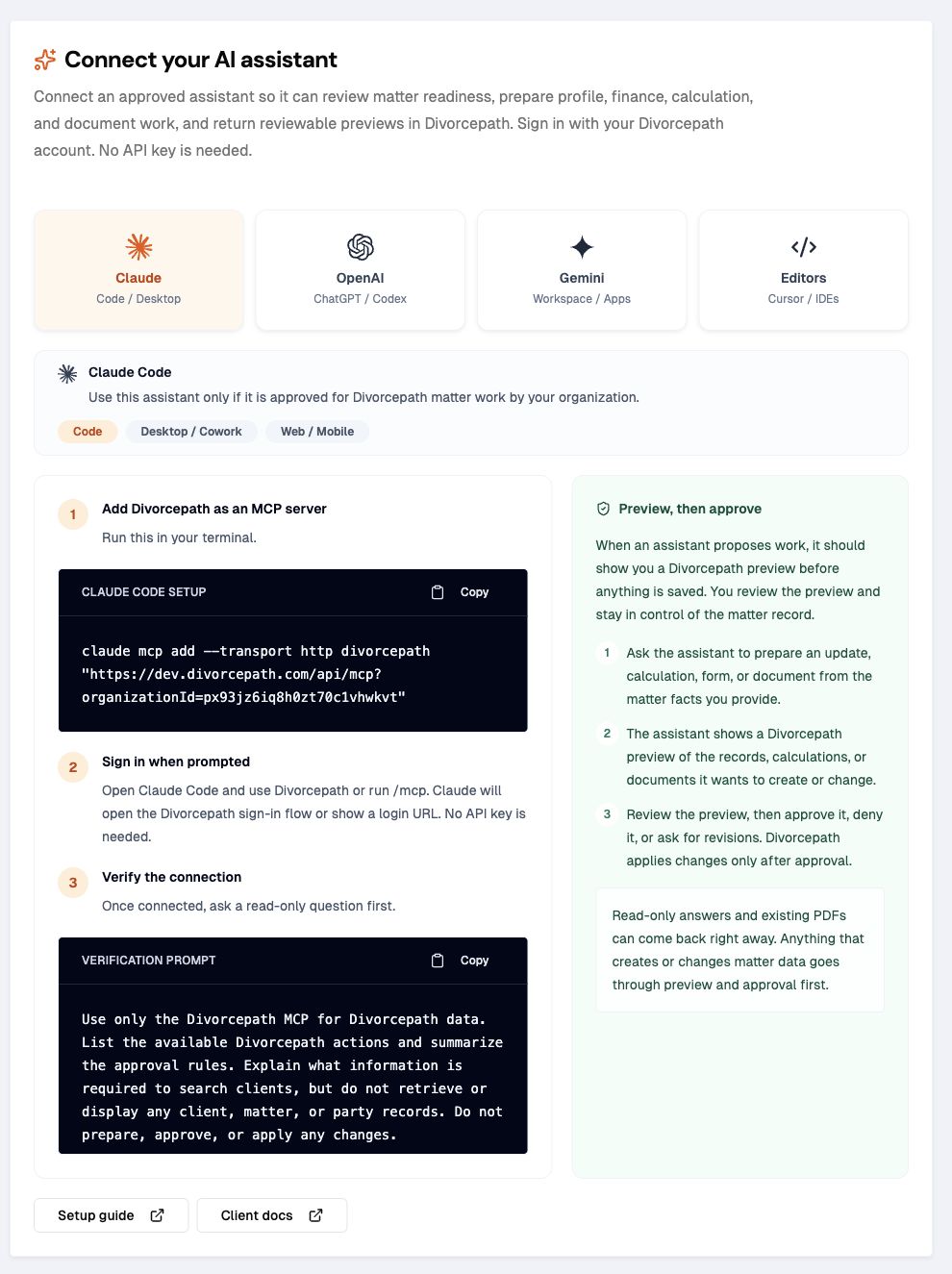
Divorcepath keeps the review step on the server. That means the same safety rule applies whether you connect Claude Desktop, Codex, ChatGPT/OpenAI MCP apps, or another approved MCP-compatible assistant.
- The assistant reads permitted Divorcepath matter context.
- The assistant prepares a proposed update, calculation, form, or document.
- Divorcepath returns a preview with the target matter, before-and-after details, warnings, risk level, expiry, and approval status.
- You approve, decline, revise, or discard the proposed work.
- Divorcepath applies only approved work that is still current and belongs to the same organization and user context.
AI Assistants do not replace professional judgment. They help prepare and organize work so your team can review it more efficiently.
Good first prompts
Use prompts like these after your assistant is connected. Codex users can install the Divorcepath skill package first; Claude, ChatGPT/OpenAI, and other approved assistants can use the same prompts directly.
Review this matter and summarize:
1. missing party, child, relationship, finance, and disclosure facts;
2. whether support calculations can be prepared;
3. which financial statement and court forms are available for this jurisdiction;
4. what you recommend I do next.
Do not save changes or generate documents until I approve a preview.
Review the client's financial records and tell me what is missing for a financial statement.
If you find one clear update to prepare, show me the before-and-after preview and stop for approval.Prepare a lawyer-readable summary of the current support calculation.
If a PDF is available, give me the link. If not, generate the PDF artifact if readiness allows it, then tell me when the signed link is ready.Review this agreement and propose tracked edits for the support and parenting sections.
Return the Divorcepath editor link so I can review, accept, or reject the changes visually.What is available now
- Read matter summaries, party profiles, disclosure status, documents, calculations, notes, comments, and activity.
- Review matter completion status and recommended next actions.
- Prepare reviewed party, relationship, child, income, asset/debt, and child-expense updates.
- Prepare support-calculation updates and retrieve lawyer-readable calculation summaries.
- Review support-calculation readiness before generating PDFs or publishing calculation values back to a profile.
- Search court-form and document templates across supported jurisdictions.
- Check template completeness before approving generated court forms, financial forms, agreements, and other template-backed documents.
- Prepare generated court forms, financial forms, agreements, and other documents from selected templates.
- Prepare anchored document-edit proposals for review in the Divorcepath editor.
- Check deeper readiness for Ontario Form 13, Form 13.1, Form 13B, and Form 13C, including Net Family Property and equalization details.
- Retrieve available Word/native documents, calculation PDFs, and inline summaries.
Current limits
- Document PDF conversion from generated Word documents is not automatic yet. Use the Divorcepath document editor/export flow when you need a PDF copy of a generated document.
- Document edit proposals are reviewed in the Divorcepath editor. Server-side DOCX byte mutation for accepted tracked changes is planned as the document engine surface matures.
- Detailed specialized readiness checks vary by jurisdiction and form type. If a specialized readiness check is not available, the assistant can still use the generic template-completeness check and prepare a reviewed document-generation request from the selected form.
- Disclosure upload, extraction, and applying selected extracted facts are available only where your organization has those assistant workflows enabled. If they are not enabled, enter or confirm extracted facts through the available Divorcepath workflows.
- An assistant should ask for missing legal or financial facts instead of guessing them.
Connect an approved assistant
Start from the AI Assistants page in Divorcepath. Choose the assistant your organization has approved, copy the connection address shown there, sign in when prompted, and follow the setup article for that assistant. Hosted Divorcepath connection addresses usually look like https://www.divorcepath.com/api/mcp?organizationId=YOUR_ORGANIZATION_ID.
- Connect Claude to Divorcepath
- Connect the Codex desktop app to Divorcepath
- Connect ChatGPT, Gemini, editors, and other approved assistants
Developer connection details
Divorcepath exposes a remote Model Context Protocol (MCP) server over Streamable HTTP. Use the connection address from your organization's AI Assistants page, including its organizationId query parameter:
https://www.divorcepath.com/api/mcp?organizationId=YOUR_ORGANIZATION_IDAuthenticate through Divorcepath sign-in using OAuth 2.0 authorization code flow with PKCE (S256). The published discovery documents describe the authorization, token and client registration endpoints:
The supported scopes are mcp:read for reading permitted context and mcp:write for tools that prepare or apply work. Request mcp:read for a read-only connection, or both scopes for reviewed work. Scopes do not override organization access, user permissions or server-side approval requirements.
After sign-in, initialize the MCP connection and use tools/list to discover the tools available to the connection. Start with a read-only matter question before trying the reviewed setup test below. A 401 response from an unauthenticated MCP request is expected; follow its WWW-Authenticate challenge to the protected-resource metadata.
Minimum setup test
After connecting an assistant, run a small reviewed workflow before using it on important matter work.
Use Divorcepath only for Divorcepath matter data.
Summarize the available Divorcepath actions and approval rules.
Read one matter summary.
Prepare one harmless preview and stop before approval.
Confirm that Divorcepath will not apply the work unless I approve it.
When to contact support
If your organization needs help enabling AI Assistants, choosing an assistant, setting up access, or interpreting a failed approval, contact Divorcepath support at [email protected].
