Codex Desktop can connect to Divorcepath when your organization wants a visible record of assistant requests, prepared work, approvals, and applied results. Divorcepath applies changes only after a user approves them.
Before you start
- Confirm that Codex Desktop is approved for your organization.
- Confirm that your Divorcepath organization has AI assistant access enabled.
- Open the AI Assistants page in Divorcepath so you can copy the connection address.
- Download the Divorcepath MCP skill package if you want Codex to use the prepared Divorcepath workflow guidance.
- Keep Codex approval prompts enabled for prepared work and applying approved work.
Install the Divorcepath Codex skill
The skill teaches Codex how to use Divorcepath MCP for matter review, profile completion, finance updates, support calculations, financial statements, forms, agreements, artifacts, and the review gate.
- Download the Divorcepath MCP skill package.
- Unzip it into your Codex skills folder.
- Restart Codex so the skill is available.
mkdir -p ~/.codex/skills
unzip divorcepath-mcp-skill-v0.1.0.zip -d ~/.codex/skills
The package does not contain organization details or credentials. Codex authorizes Divorcepath through the sign-in flow after the MCP server is added.
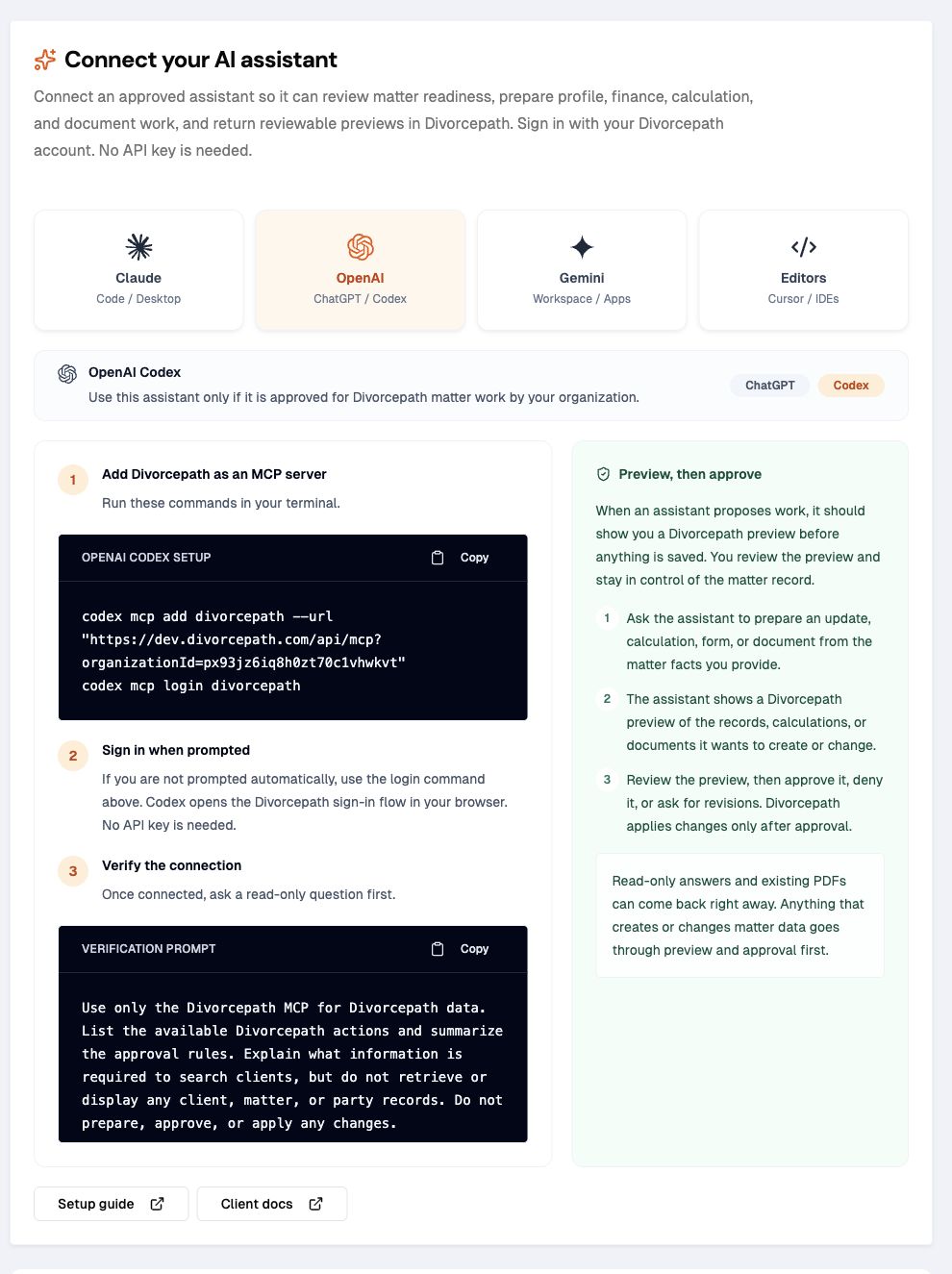
Add Divorcepath to Codex
Use the commands from the AI Assistants page, or add a Divorcepath MCP server block to your Codex config. Keep the tool names in the approval sections exactly as shown.
codex mcp add divorcepath --url "https://www.divorcepath.com/api/mcp?organizationId=YOUR_ORGANIZATION_ID"
codex mcp login divorcepath
[mcp_servers.divorcepath]
url = "https://www.divorcepath.com/api/mcp?organizationId=YOUR_ORGANIZATION_ID"
default_tools_approval_mode = "prompt"
[mcp_servers.divorcepath.tools.approve_intent]
approval_mode = "prompt"
[mcp_servers.divorcepath.tools.commit_intent]
approval_mode = "prompt"Confirm the connection
- Restart Codex after adding the connection.
- Run
/mcp. - If Codex has not already prompted you, use the login command from the setup block above.
- Sign in to Divorcepath when Codex opens a browser flow or shows a login URL.
- Confirm Divorcepath appears as an available connection.
- Ask Codex to summarize what Divorcepath can do and how approval works.
Recommended test prompt
Use only the configured Divorcepath MCP server for Divorcepath data.
List the available Divorcepath actions and summarize the approval rules.
Read one matter summary, list missing profile and finance facts,
prepare a sample preview that does not change a matter, and stop for user review.
Do not approve or apply the prepared work until I explicitly approve it.
Skill-enabled prompt
After installing the skill, you can ask Codex to use the Divorcepath workflow directly:
Use $divorcepath-mcp.
Review this Divorcepath matter for party, child, relationship, finance, disclosure, calculation, and document readiness.
Tell me what is missing and what work product can be prepared.
If one safe update is clear from the facts I provide, prepare it as a reviewed preview and stop for approval.
What to confirm during setup
During setup, keep enough detail to reproduce the connection and confirm the review process is working as expected.
- Codex setup details and Divorcepath connection name
- the exact prompt used
- tool calls and prepared-work ids, if Codex shows them
- approval, decline, apply, and discard outcomes
- any confusing descriptions, missing preview data, or unclear error messages
- whether Codex asked for missing facts instead of guessing
Setup checklist
- Codex can discover Divorcepath in
/mcp. - Codex can read a client, calculation, document, or setup details.
- Codex can prepare a sample preview that does not change a matter.
- Divorcepath blocks applying prepared work until the work is approved.
- Codex can discard declined work.
- Codex can apply an approved sample preview, then confirm the result.
Useful Codex workflows
Codex is especially useful when you want a visible transcript of the request, tool calls, review step, and result.
- ask Codex to inspect matter readiness before preparing updates
- update a party profile, relationship fact, child record, income source, asset, debt, or child expense from user-provided facts
- review a support calculation and prepare a calculation update preview
- search financial statement and court-form templates across supported jurisdictions
- generate selected court forms or specialized Ontario Form 13.1, Form 13B, or Form 13C documents after reviewing readiness warnings
- retrieve calculation summaries, available calculation PDFs, generated Word documents, and inline document summaries
Review this matter for support-calculation and financial-statement readiness.
Find the relevant court-form templates for the matter's jurisdiction.
Show me the missing facts and recommended next actions.
If one safe update is clear from the facts I provide, prepare it for review.
Do not approve or commit the prepared work until I explicitly say to approve it.
Where Codex fits
Use Codex when your organization wants a clear record of requests, previews, approvals, and results. The same Divorcepath review rule applies regardless of which approved AI assistant you use.
