Claude Code, Claude Desktop, and Claude for Work can connect to Divorcepath so an approved assistant can read permitted matter context and prepare calculation or document work for review. Divorcepath applies changes only after a user approves them.
Before you start
- Confirm that Claude is approved for your organization on the surface you plan to use.
- Confirm that your Divorcepath organization has AI assistant access enabled.
- Open the AI Assistants page in Divorcepath so you can copy the connection address.
- Keep Claude approval prompts enabled for prepared work.
- Start with a read-only matter question or a sample preview that does not change a matter.
Connection address
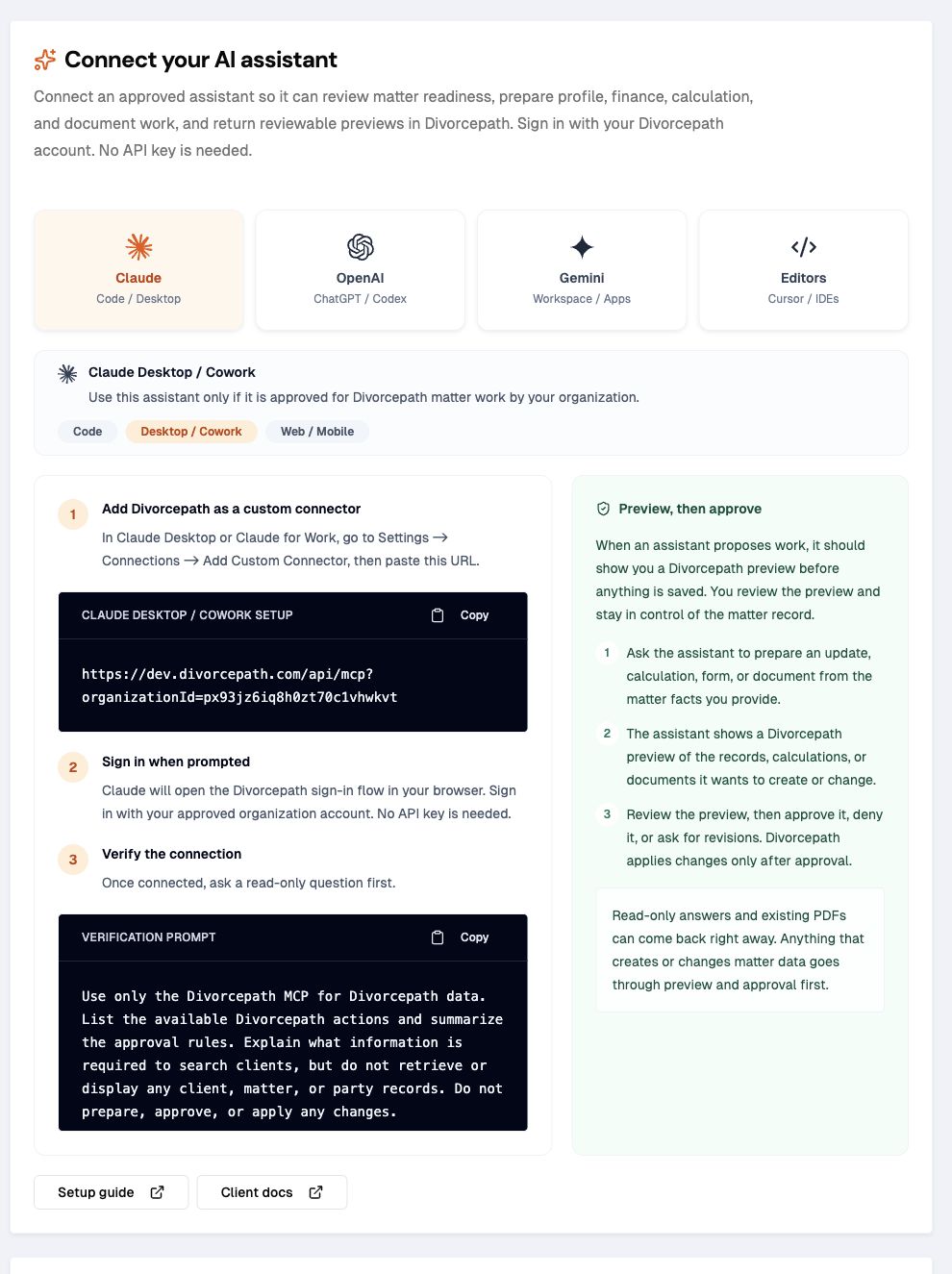
Your Divorcepath connection address should include organization scope:
https://www.divorcepath.com/api/mcp?organizationId=YOUR_ORGANIZATION_IDIf your organization uses a dedicated Divorcepath environment, use the connection address shown on the AI Assistants integration page.
Add Divorcepath to Claude
In Claude Code, use the setup command below. In Claude Desktop or Claude for Work, go to Settings → Connections → Add Custom Connector, then paste the connection address. Claude should open the Divorcepath sign-in flow or show a login URL. No API key is needed.
claude mcp add --transport http divorcepath "https://www.divorcepath.com/api/mcp?organizationId=YOUR_ORGANIZATION_ID"Recommended first prompt
Use the Divorcepath MCP only for Divorcepath data.
List the available Divorcepath actions and summarize the approval rules.
Read one matter summary.
Tell me what party, child, relationship, finance, disclosure, calculation,
and document facts are missing.
Prepare one harmless preview and stop before approval.
Do not approve or apply the prepared work until I explicitly approve it.
Reusable prompt pack
The Divorcepath MCP skill package includes a prompt pack that can be used even when Claude does not install Codex skills. Download the package and copy the prompts from references/prompts.md.
Download the Divorcepath MCP skill package
What Claude should do
- summarize that prepared work must be reviewed before Divorcepath applies it
- read matter context before proposing a change
- ask for missing facts rather than guessing legal or financial inputs
- show the proposed work clearly before asking for approval
- wait for explicit approval before applying prepared work
Good Claude workflows
Claude is best used for guided review and drafting-style conversations. Good first requests include:
- review a matter and summarize what is missing before generating financial statements or court forms
- prepare party, child, relationship, income, asset, debt, or child-expense updates for review
- inspect a support calculation and ask for missing facts before preparing changes
- find financial statement and court-form templates for the relevant jurisdiction
- check deeper readiness for forms where Divorcepath has specialized support, such as Ontario Form 13.1, Form 13B, and Form 13C
- prepare a financial statement, court form, Net Family Property statement, or agreement from approved matter data
- retrieve a lawyer-readable calculation summary or a generated Word document
Useful workflow prompt
Review this matter for financial-statement and court-form readiness.
Find the available financial statement forms for the relevant jurisdiction.
Tell me what facts are missing before the form can be generated confidently.
If the matter is ready enough, prepare the recommended form generation request.
Show me the preview and wait for approval before anything is saved or generated.
Common issues
| Issue | What to check |
|---|---|
| Claude cannot find Divorcepath | Confirm the connection address is reachable from Claude and includes the correct organization id. |
| Authentication fails | Confirm the user can sign in to Divorcepath, belongs to the selected organization, and that AI assistant access is enabled. |
| Prepared work cannot be applied | Confirm the proposed work was approved, has not expired, and belongs to the same organization and user context. |
| Claude guesses missing facts | Ask Claude to inspect the calculation or document setup and ask follow-up questions before preparing work. |
Next steps
After the read-only check succeeds, prepare one sample preview and decline it, then prepare another sample preview and approve it only after reviewing the before-and-after details.
