The Finances tab in a client file is where you enter all financial information for both parties. This data drives child support and spousal support calculations, financial statements, and other documents generated by Divorcepath. Accurate and complete financial data is essential for reliable results.
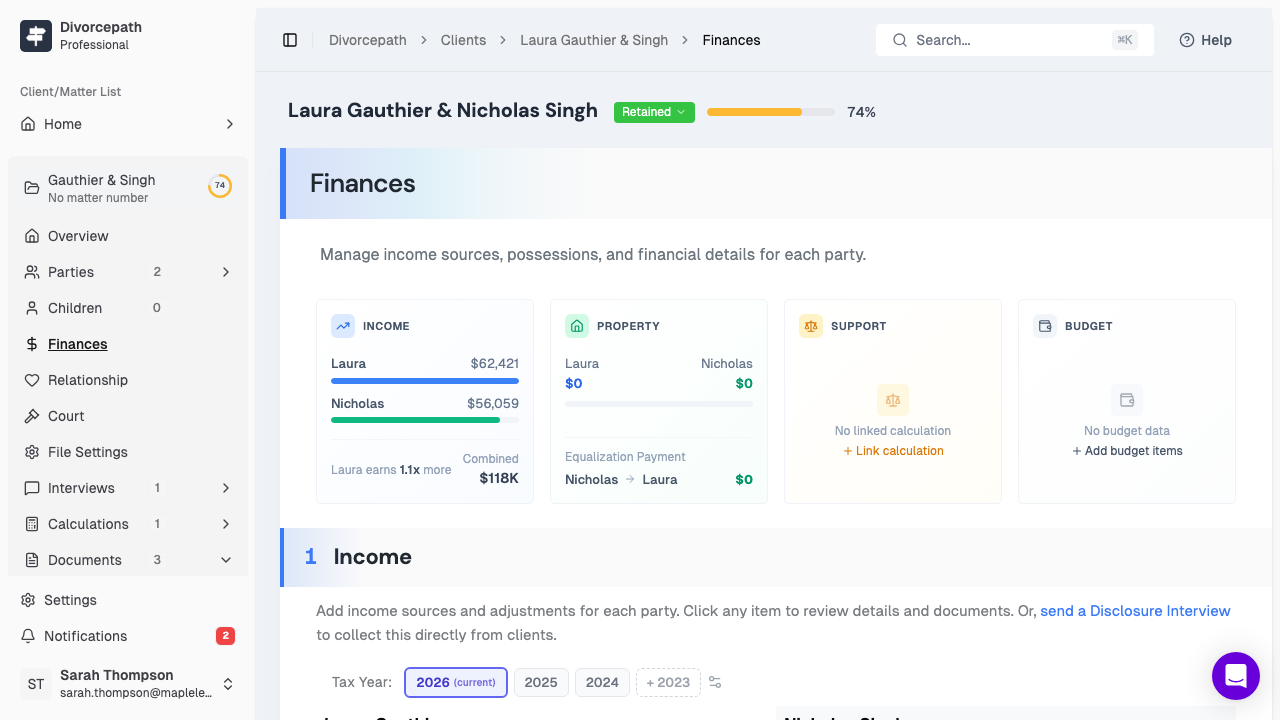
Finances Tab Overview
The Finances tab is organized into several sections covering income, expenses, assets, and liabilities. Financial information can be entered for both the client and the ex-party. Each section is designed to capture the specific types of financial data required for Canadian family law support calculations.
Adding Income Sources
Income is the foundation of support calculations under the Federal Child Support Guidelines. Divorcepath supports a range of income source types:
- Employment income — salary, wages, bonuses, commissions, and other employment earnings. Enter the gross annual amount as reported on the party's T4 slip or pay stubs.
- Self-employment income — income from a business, profession, or trade. This may require adjustments for personal expenses, depreciation, or other items commonly addressed in guideline income calculations.
- Investment income — dividends, interest, capital gains, and other income from investments.
- Rental income — net income from rental properties after deducting eligible expenses.
- Other income — government benefits, pensions, employment insurance, workers' compensation, and any other sources of income not covered by the categories above.
To add an income source:
- Navigate to the Finances tab in the client file.
- Select the party (client or ex) whose income you wish to enter.
- Click Add Income and select the appropriate income type.
- Enter the income amount and any relevant details.
- Save the entry.
You can add multiple income sources for each party. All income sources are combined to determine the party's total guideline income for support calculation purposes.
Income by Tax Year
Financial data in Divorcepath is organized by tax year. You can enter income for multiple tax years, which is useful when income has varied significantly from year to year or when a court may consider a multi-year average. Be sure to select the correct tax year when entering income information so that calculations reference the appropriate period.
Adding Expenses and Budget Items
The expenses section allows you to record the monthly or annual living expenses for each party. Common expense categories include housing, transportation, food, childcare, and personal expenses. To add an expense:
- In the Finances tab, navigate to the Expenses section.
- Select the party and click Add Expense.
- Choose the expense category and enter the amount.
- Indicate whether the amount is monthly or annual.
- Save the entry.
Expense data is used to generate financial statements and can support arguments about the standard of living or the needs and means of each party in spousal support analyses.
Assets and Liabilities
The Assets and Liabilities sections capture each party's property and debts:
- Assets — real property, vehicles, bank accounts, investments, RRSPs, pensions, and other property. Enter the current market value and, where applicable, the value at the date of separation.
- Liabilities — mortgages, credit card debt, loans, lines of credit, and other obligations. Enter the current outstanding balance.
Asset and liability information is used in financial statements and can be relevant to property division and the overall financial picture of each party.
How Financial Data Connects to Calculations and Statements
The financial data you enter in the Finances tab flows directly into several key outputs:
- Child support calculations — total guideline income determines the applicable table amount under the Federal Child Support Guidelines. Special or extraordinary expenses (section 7 expenses) can also be added and are shared between the parties in proportion to their incomes.
- Spousal support calculations — income data is used to calculate spousal support ranges under the Spousal Support Advisory Guidelines, taking into account the incomes of both parties, the length of the relationship, and other relevant factors.
- Financial statements — income, expenses, assets, and liabilities are automatically populated into court-required financial disclosure forms.
Tips for Accurate Data Entry
To ensure the most reliable calculations and documents:
- Use source documents — wherever possible, enter financial data directly from tax returns, T4 slips, pay stubs, bank statements, and other official records.
- Be consistent with periods — ensure that income amounts are entered as annual figures and that expenses are consistently entered as either monthly or annual amounts.
- Account for all income sources — guideline income includes more than just employment income. Review the party's tax return carefully for dividends, rental income, capital gains, and other sources.
- Update regularly — financial circumstances change over time. Keep income and expense data current, especially when preparing for a court application or negotiation.
- Select the correct tax year — make sure you are entering data for the appropriate tax year, particularly when entering historical income for averaging purposes.
Taking the time to enter complete and accurate financial data will ensure that your support calculations and financial statements are reliable and defensible.
