The Divorcepath Document Editor is a browser-based editor that allows you to view and edit DOCX documents directly within Divorcepath, without needing Microsoft Word or any other desktop software. It is designed specifically for working with legal documents such as court forms, agreements, and financial statements.
Opening a Document in the Editor
To open a document in the editor:
- Navigate to the Documents tab within a client file.
- Click on the document you wish to edit.
- The document will open in the Document Editor in a new view.
Editor Layout
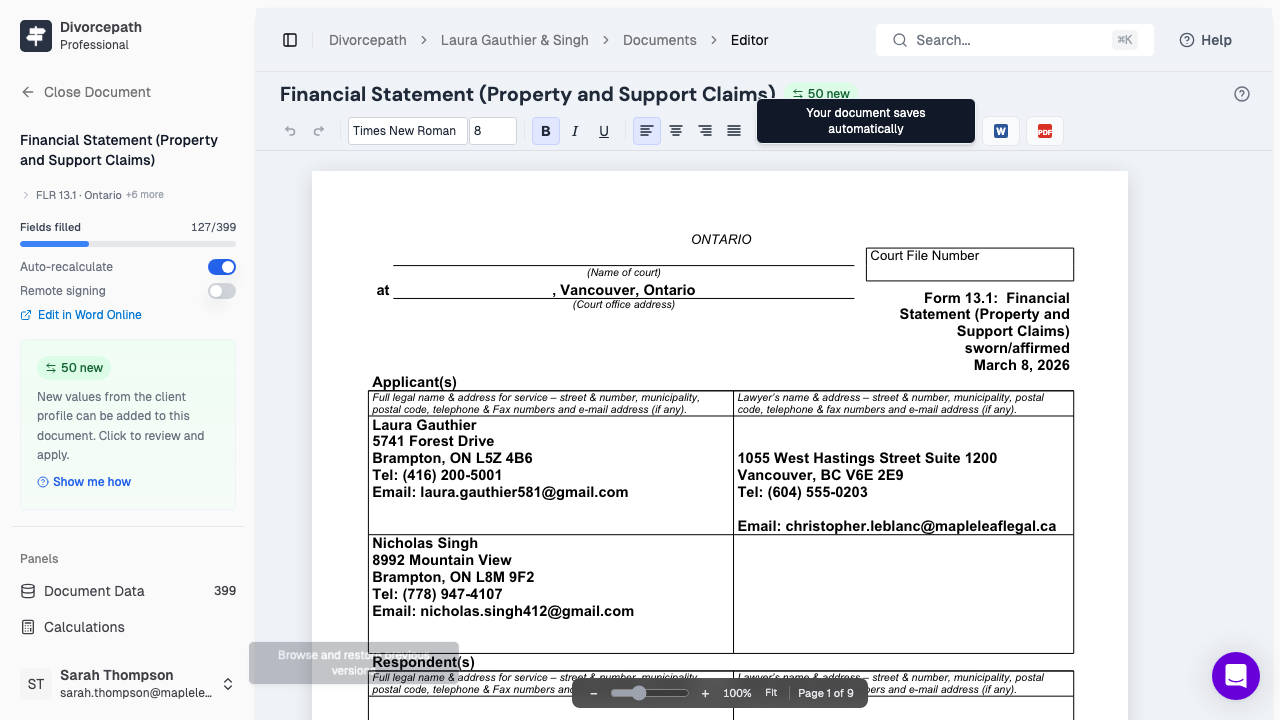
The editor interface is divided into three main areas:
- Toolbar — located at the top of the editor, the toolbar provides access to formatting options such as bold, italic, underline, font size, text alignment, and lists. It also includes undo and redo buttons.
- Document Canvas — the central area where the document content is displayed. You can click anywhere in the document to begin editing. The canvas renders the document with accurate page layout, including headers, footers, and page breaks.
- Panels — located on the right side of the editor, panels provide additional tools and information. You can toggle panels on and off using the panel buttons in the toolbar.
Available Panels
The editor includes four panels that assist with different aspects of document editing:
- Data — displays all content controls and fields in the document, showing how data from the client profile maps to specific fields. You can review and edit field values from this panel.
- Sections — allows you to show or hide sections of the document. This is especially useful for court forms and agreements where certain sections may or may not apply to a particular matter.
- Calculations — displays automatic calculations within the document, such as subtotals and cross-references in financial statements. Calculations update when the underlying data changes.
- History — provides access to document version history, including snapshots. You can also undo and redo changes from this panel.
Auto-Save
The Document Editor saves your changes automatically as you work. You do not need to manually save the document. A save indicator in the toolbar shows when changes have been saved. This ensures that your work is never lost, even if you close the browser or lose your internet connection temporarily.
How the Editor Differs from Microsoft Word
The Divorcepath Document Editor is purpose-built for legal document workflows and differs from Microsoft Word in several ways:
- It runs entirely in your browser, so there is nothing to install or update.
- It is integrated with client data, allowing fields to be automatically populated and updated.
- It includes panels for managing document sections, data fields, and calculations that are not available in Word.
- It supports a focused set of formatting options tailored to legal documents, rather than the full feature set of a general-purpose word processor.
Supported Formatting
The editor supports the formatting options most commonly used in legal documents:
- Bold, italic, and underline text styles
- Font size adjustments
- Text alignment (left, centre, right, justified)
- Numbered and bulleted lists
- Tables
- Headers and footers
- Page breaks
Getting Started
If this is your first time using the Document Editor, the best way to get started is to open a document and explore the interface. Click on the document canvas to place your cursor and begin typing. Use the toolbar buttons to apply formatting, and try opening the panels on the right side to see the additional tools available. The editor is designed to be intuitive, so you can start working with documents right away.
